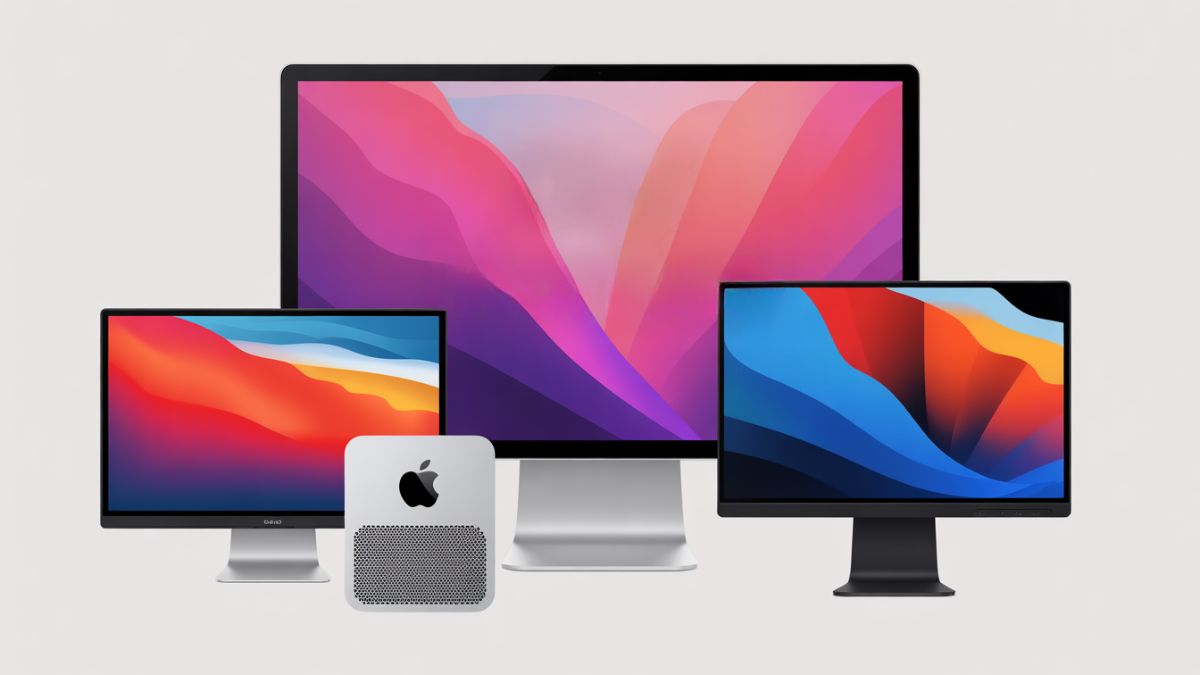
Choosing the best BenQ monitor for your Mac Mini M4 can boost your productivity and viewing experience. BenQ offers a range of monitors that fit different needs and budgets.
The Mac Mini M4 is a powerful device that deserves a high-quality display. BenQ monitors provide sharp images, accurate colors, and ergonomic designs. Whether you are a creative professional, coder, or casual user, there is a BenQ monitor suited for you.
Some models feature 4K or 5K resolution, USB-C connectivity, and eye-care technology. Others offer specialized features for photo editing, gaming, or office use. This guide will help you find the perfect BenQ monitor to match your Mac Mini M4 setup.
Benq Pd2730s 27″ Mac Monitor

The BenQ PD2730S 27″ 5K Mac Monitor is ideal for 3D artists, VFX animators, and game designers who demand superior color accuracy and high resolution in their work. If you need a professional-grade display with exceptional detail and color fidelity, this monitor is designed to meet the needs of creative professionals who rely on precise visuals for their projects.
Pros:
- 5K resolution with 218 PPI for ultra-clear images and sharp details
- 90W Thunderbolt 4 connectivity for fast data transfer and charging
- 98% P3 color gamut coverage ensures vibrant and accurate colors
- Uniformity technology for consistent brightness across the screen
- 2000:1 contrast ratio enhances image depth and clarity
- Nano Matte Panel reduces reflections and glare
- Daisy chain and KVM switch support for multi-device workflow
- Height adjustable stand for ergonomic comfort
Cons:
- Relatively heavy at 17.5 pounds, which may limit portability
- Premium features come with a higher price point compared to standard monitors
- Limited color options as it comes only in white
The BenQ PD2730S boasts a stunning 27-inch 5K display with a pixel density of 218 PPI, making it perfect for professionals who need to work with intricate designs and high-resolution content. Its 98% P3 color gamut ensures that colors are displayed vividly and accurately, which is crucial for creative workflows where color precision is paramount. The uniformity technology provides consistent brightness, preventing distracting hotspots and ensuring a smooth viewing experience across the entire screen.
Connectivity is another strong point with the inclusion of Thunderbolt 4 ports that support up to 90W power delivery, enabling fast charging and seamless connection to multiple devices. The daisy chain feature simplifies multi-monitor setups, while the integrated KVM switch allows users to control multiple computers with a single keyboard and mouse, enhancing productivity. Additionally, the height adjustable stand promotes ergonomic comfort during long hours of work, making the BenQ PD2730S a comprehensive and professional solution for demanding creative professionals.
To buy this product, click here.
Benq Pd2705u Mac-ready Monitor 27″ 4k Uhd

The BenQ PD2705U Mac-Ready Monitor is ideal for professional creatives, graphic designers, and video editors who demand precise color accuracy and high-resolution visuals. This monitor is perfect for users who require seamless compatibility with Mac systems and a reliable display that supports detailed and vibrant 4K UHD content.
Pros:
- 27″ 4K UHD IPS panel delivers stunning, sharp visuals with wide viewing angles.
- DeltaE ≤3 ensures exceptional color accuracy for professional-grade work.
- ICC Sync and Calibration Report provide confidence in color consistency.
- Ergonomic design with adjustable height and tilt for comfort during long work hours.
- HotKey Puck for quick access to settings enhances workflow efficiency.
- USB-C (65W) and USB Hub allow easy connectivity and charging of devices.
Cons:
- The monitor’s price point may be high for casual users or beginners.
- Some users may find the 20.5-pound weight less portable.
The BenQ PD2705U boasts a crystal-clear 27-inch 4K UHD IPS display that ensures every detail is visible with vibrant colors and deep contrasts, making it ideal for detailed design work. The inclusion of DeltaE ≤3 color accuracy guarantees that the colors you see on screen are true to life, which is essential for color grading, photo editing, and other creative tasks.
Additionally, the monitor’s ICC Sync and professional calibration report provide a trustworthy color foundation, reducing the need for frequent adjustments. Its ergonomic features, including height and tilt adjustments, allow users to customize their setup for maximum comfort, reducing strain during extended use. The versatile connectivity options like USB-C with 65W power delivery and a built-in USB hub streamline workspace organization and device management, making the PD2705U a powerful tool for Mac users and creative professionals alike.
To buy this product, click here.
Hideit Mounts Mac Mini M4 Mount

The HIDEit Mounts Mac mini M4 Mount is ideal for users looking to maximize their workspace efficiency and maintain an organized setup. Whether you’re a professional using the latest Apple Mac mini M4 or M4 Pro or a tech enthusiast seeking a sleek mounting solution, this product is designed to keep your device secure and enhance airflow while minimizing clutter. It’s perfect for those who value both functionality and a clean aesthetic in their home or office environment.
Pros:
- Designed specifically for the 2024 Mac mini M4 and M4 Pro, ensuring perfect compatibility.
- Enables under desk or VESA monitor mounting to save valuable desk space.
- Constructed to allow proper airflow, preventing overheating of your Mac mini.
- Includes all necessary hardware for easy and secure installation.
- Lightweight and discreet black design that blends seamlessly with most setups.
Cons:
- Mounting options limited to desks or VESA-compatible monitors only.
- May require additional tools or expertise for installation if unfamiliar with mounting hardware.
The HIDEit Mounts Mac mini M4 Mount offers a practical solution to keep your Apple Mac mini M4 off your desk and out of the way, allowing for a cleaner and more organized workspace. Its design prioritizes proper airflow, which is essential to maintain the device’s performance and longevity by preventing overheating. The mount’s compatibility with the latest Mac mini models guarantees a secure fit and stability during use.
Additionally, the option to mount your Mac mini under a desk or behind a VESA-compatible monitor adds versatility to your setup, freeing up valuable desk space for other tasks. The inclusion of all necessary hardware simplifies the installation process, making it accessible for both professionals and casual users. Its sleek black finish ensures it will complement any modern workspace without drawing unnecessary attention.
To buy this product, click here.
Benq Gw2790 27″ Monitor

The BenQ GW2790 27″ Monitor is ideal for users seeking a high-quality, eye-friendly display for both work and entertainment. Whether you’re a professional who spends long hours in front of a screen, a student attending online classes, or a casual gamer looking for smooth visuals, this monitor offers a perfect balance of performance and comfort. Its combination of features caters especially well to those who prioritize eye care and visual clarity.
Pros:
- 100Hz refresh rate for smoother motion and reduced blur.
- Full HD 1920x1080p resolution with IPS panel for vibrant colors and wide viewing angles.
- Eye-care technologies including Low Blue Light and Adaptive Brightness to reduce eye strain during extended use.
- VESA mount compatibility allowing flexible placement and ergonomic setups.
- Multiple connectivity options with DisplayPort and dual HDMI ports.
- Thin bezel design enhances multi-monitor setups and aesthetics.
Cons:
- Lacks 4K resolution, which might be a drawback for users needing ultra-high definition.
- The monitor’s weight of over 11 pounds may make it less portable.
- Limited adjustment options without an ergonomic stand included.
The BenQ GW2790 features a 27-inch IPS panel that delivers consistent and accurate colors with wide viewing angles, making it suitable for graphic design, video editing, and general multimedia consumption. The 100Hz refresh rate ensures smooth visuals, which benefits both gaming enthusiasts and professionals who work with fast-moving content. Combined with the Full HD resolution, users enjoy clear and sharp images without the need for a higher-cost 4K display.
One of the standout benefits of this monitor is its commitment to eye-care technology. The Low Blue Light mode helps reduce harmful blue light exposure, while Adaptive Brightness automatically adjusts screen brightness based on ambient lighting conditions. This reduces eye fatigue during prolonged usage. Additionally, the thin bezel design not only provides a sleek and modern look but also facilitates seamless multi-monitor setups. The inclusion of versatile ports like DisplayPort and dual HDMI inputs offers convenience for connecting multiple devices simultaneously.
To buy this product, click here.
Innocn 32″ Oled 4k Monitor
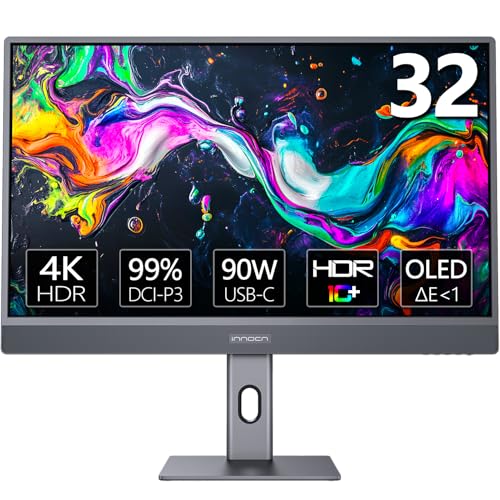
The INNOCN 32″ OLED 4K Monitor is ideal for creative professionals, Mac users, and anyone seeking a high-resolution display with accurate color representation. If you own a Mac mini, MacBook Air, or MacBook Pro and require a monitor that complements your device’s capabilities, this monitor is designed to meet your needs. It is also perfect for photographers, video editors, and designers who demand vibrant colors and sharp details.
Pros:
- Stunning 32-inch OLED 4K display with 3840 x 2160 resolution for crystal-clear visuals.
- Supports HDR 10 for enhanced contrast and color depth.
- Wide color gamut coverage: 99% DCI-P3 and 99% sRGB for accurate color reproduction.
- USB-C connectivity for seamless compatibility with Mac devices.
- Tilt and height adjustable stand for ergonomic comfort.
- VESA mountable for flexible installation options.
Cons:
- Relatively heavy at 17 pounds, which may require a sturdy desk or mount.
- Premium features come with a higher price point compared to standard monitors.
The INNOCN 32″ OLED 4K Monitor boasts a gorgeous OLED panel that delivers exceptional contrast ratios, with a staggering 1M:1 contrast ratio ensuring deep blacks and vibrant colors. The 3840 x 2160 4K resolution provides ample screen real estate and incredibly sharp images, making it perfect for detailed photo and video editing tasks. Its support for HDR 10 enhances the viewing experience by offering richer highlights and more lifelike shadows.
Connectivity is seamless with the inclusion of a USB-C port, which allows for both video signal and power delivery, making it especially convenient for MacBook users. The monitor’s color accuracy is exceptional, covering 99% of both DCI-P3 and sRGB color spaces, ensuring that colors are true to life and consistent across different devices. Additionally, the ergonomic tilt and height adjustable stand, along with the VESA mount compatibility, offers flexible setup options to enhance user comfort and productivity. Overall, this monitor is a superb choice for those seeking a professional-grade display with outstanding visual performance.
To buy this product, click here.
Benq Sw321c Photo Video Editing Monitor 32″ 4k Uhd

The BenQ SW321C Photo Video Editing Monitor 32″ 4K UHD is ideal for professional photographers, videographers, and graphic designers who demand precise color accuracy and exceptional image quality for their creative projects. If you require a monitor that supports a wide color gamut and offers hardware calibration, this monitor is designed to meet those high standards.
Pros:
- Supports 99% AdobeRGB, 100% sRGB, and 95% P3 color spaces for vibrant and accurate color reproduction
- 4K UHD resolution on a large 32-inch IPS panel for sharp and detailed visuals
- Hardware calibrated with a 16 bit 3D LUT and DeltaE ≤2 for professional-grade color precision
- Uniformity technology ensures consistent brightness and color across the entire screen
- Ergonomic design for comfortable long editing sessions
- Features USB-C with 60W power delivery for convenient connectivity and charging
- Supports HLG and AQCOLOR for advanced HDR and color workflows
Cons:
- Relatively heavy weight at over 26 pounds, which might require a sturdy desk or mount
- Premium features come with a higher price point compared to standard monitors
- May require some technical knowledge to fully utilize calibration and color management features
The BenQ SW321C monitor boasts a stunning 32-inch 4K UHD IPS panel that delivers crisp, clear images with exceptional detail, perfect for photo and video editing tasks. Its wide color gamut coverage including 99% AdobeRGB and 95% P3 ensures that colors appear rich and accurate, matching the output requirements of professional print and digital media workflows. The hardware calibration capability combined with a 16-bit 3D LUT enables precise color adjustments that maintain consistency across different devices and platforms.
Additionally, the monitor’s uniformity technology guarantees consistent brightness and color across the entire screen, eliminating distracting variations and allowing creatives to focus on their work without compromise. The ergonomic stand and the inclusion of USB-C connectivity with 60W power delivery make it a versatile and comfortable tool for long editing sessions, streamlining both workspace setup and peripheral connections. Support for HLG and AQCOLOR further enhances its suitability for video professionals working with HDR content, making the BenQ SW321C a comprehensive solution for demanding visual artists.
To buy this product, click here.
Benq Gw2786tc Monitor

The BenQ GW2786TC Office USB hub Monitor 27″ is ideal for professionals and remote workers who need a versatile and ergonomic display for long hours of productivity. Those involved in coding, office tasks, or multitasking will benefit greatly from its advanced features like Eye-Care Technology, Adaptive Brightness, and USB-C connectivity. This monitor suits users who want a comfortable viewing experience combined with practical USB hub functionality and enhanced audio input with a noise-cancelling microphone.
Pros:
- 27-inch IPS panel with crisp 1080p resolution for vibrant visuals
- Coding Mode reduces eye strain during extended screen time
- Eye-Care Technology minimizes flicker and blue light exposure
- Height adjustable stand for ergonomic comfort
- Adaptive Brightness automatically adjusts screen brightness to ambient light
- USB-C hub enables easy device connection and charging
- Noise-cancelling microphone ideal for clear communication during calls
- Daisy Chain support for multi-monitor setups
- Elegant white design fits modern office environments
Cons:
- Only 1080p resolution may not satisfy users seeking 4K quality
- Heavier weight at 21.52 pounds might limit portability
- Limited to USB-C and standard USB hubs, no Thunderbolt support
The BenQ GW2786TC features a 27-inch IPS panel delivering consistent and vibrant colors with wide viewing angles, making it perfect for coding, document editing, and multimedia consumption. Its Coding Mode optimizes the color temperature and contrast to reduce eye fatigue during long programming sessions. With Eye-Care Technology, users benefit from flicker-free visuals and reduced blue light emission, protecting their eyes throughout the workday.
Additionally, the monitor’s adaptive brightness sensor automatically adjusts the display’s brightness according to ambient lighting, enhancing viewing comfort while saving energy. The height-adjustable stand allows users to customize their ergonomic setup, reducing neck and back strain. Connectivity is enhanced with a built-in USB-C hub that simplifies device management and charging, while the noise-cancelling microphone ensures crystal-clear audio for virtual meetings. The daisy chain feature enables seamless multi-monitor configurations, boosting productivity for multitasking professionals.
To buy this product, click here.
Benq Rd240q 24.1” Wqxga Programming Monitor

The BenQ RD240Q 24.1” WQXGA Programming Monitor is ideal for programmers, software developers, and tech professionals who require a high-resolution display with features tailored to coding efficiency and eye comfort. If you spend long hours in front of a screen and need an ergonomic, feature-rich monitor to enhance productivity and reduce eye strain, this monitor is designed specifically for you.
Pros:
- 90W USB Type-C connectivity for fast data transfer and power delivery
- Advanced Coding Modes and Coding HotKey for optimized programming experience
- Ergonomic Design allowing adjustable height and tilt for comfortable use
- 16:10 Special Ratio providing extra vertical screen space for better code visibility
- Circadian Mode and Eye-Care Technology to reduce eye fatigue during prolonged use
- Eco-Friendly Design supporting sustainable usage
Cons:
- Relatively heavy weight at 16.8 pounds, which may affect portability
- Price may be higher compared to standard monitors without specialized coding features
- Limited color options available (only black)
The BenQ RD240Q boasts a stunning 24.1-inch WQXGA display with a 16:10 aspect ratio, giving users more vertical space to view code and documents simultaneously. This special ratio enhances productivity by reducing the need for constant scrolling, making it perfect for multitasking developers. The inclusion of advanced coding modes and a dedicated coding hotkey streamlines the workflow, allowing programmers to switch display settings quickly to suit different coding environments.
Additionally, its ergonomic design supports prolonged use by enabling users to adjust the monitor’s height and tilt to their preferred position, reducing neck and back strain. The innovative Eye-Care Technology and Circadian Mode protect users from eye fatigue and improve comfort during extended coding sessions, adjusting brightness and color temperature based on ambient lighting. Together with its eco-friendly design, this monitor not only improves user experience but also promotes sustainability.
To buy this product, click here.
Benq Mobiuz Ex3210u Gaming Monitor
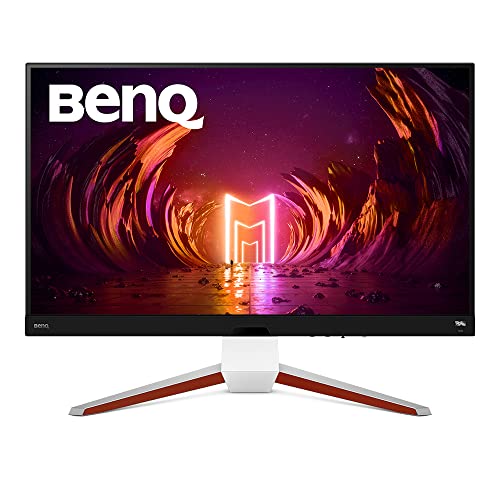
The BenQ MOBIUZ EX3210U Gaming Monitor is ideal for avid gamers and creative professionals who demand top-tier performance and stunning visuals. If you seek a large 32-inch 4K UHD display with a blazing 144Hz refresh rate and rapid 1ms response time, this monitor is perfect for immersive gaming and precise color work. Additionally, users who value ergonomic flexibility and advanced audio features will find this monitor meets all their needs.
Pros:
- 4K UHD resolution offers crisp and detailed visuals for an immersive experience.
- High 144Hz refresh rate and 1ms response time ensure smooth and lag-free gaming performance.
- IPS panel with wide AdobeRGB and P3 color gamut coverage delivers vibrant and accurate colors.
- HDRi technology enhances contrast and brightness for lifelike images.
- Freesync Premium Pro support reduces screen tearing and stuttering.
- Ergonomic height, swivel, and tilt adjustments for personalized comfort.
- Built-in 2.1 audio system with subwoofer and noise-cancelling mic provide excellent sound quality and communication.
- HDMI 2.1 compatibility supports next-gen gaming consoles and high bandwidth connections.
Cons:
- Relatively heavy at over 23 pounds, which may require a sturdy desk or mount.
- Premium features come at a higher price point compared to standard monitors.
- Color calibration might be necessary for professional use despite excellent factory settings.
The BenQ MOBIUZ EX3210U stands out with its stunning 4K UHD resolution combined with a fast 144Hz refresh rate and quick 1ms response time, making it ideal for fast-paced gaming where every millisecond counts. The IPS panel ensures wide viewing angles and rich color reproduction, enhanced further by the inclusion of AdobeRGB and P3 color gamut support, which is beneficial for content creators who require color accuracy. The monitor’s HDRi technology dynamically adjusts brightness and contrast to deliver realistic scenes, enhancing the overall visual quality.
Ergonomics and audio are also prioritized, with adjustable height, swivel, and tilt features allowing users to find the perfect setup for long sessions. The integrated 2.1 channel audio system with subwoofer provides powerful sound without the need for external speakers, while the noise-cancelling microphone facilitates clear communication during multiplayer games or remote work. Additionally, Freesync Premium Pro support reduces screen tearing, and HDMI 2.1 compatibility ensures seamless connectivity with modern gaming consoles and devices.
To buy this product, click here.
Benq W4100i 4k Hdr Smart Home Theater Projector

The BenQ W4100i 4K HDR Smart Home Theater Projector is ideal for home cinema enthusiasts and tech-savvy individuals seeking a premium viewing experience. If you want to transform your living room into a personal movie theater with vibrant colors, sharp details, and smart streaming capabilities, this projector is a perfect choice. It is also well-suited for those who value easy installation and high-quality image calibration without the need for constant adjustments.
Pros:
- Bright 3200 Lumens output ensures clear images even in moderately lit rooms.
- Supports 100% DCI-P3 and Rec.709 color standards for accurate and vivid colors.
- Factory-Calibrated for optimal picture quality out of the box.
- Integrated Android TV with Netflix and other streaming apps for convenient entertainment.
- Advanced 4-Way Lens Shift allows flexible projector placement.
- Supports HDR10+ and HLG for enhanced dynamic range and contrast.
- Long-lasting LED light source reduces maintenance and replacement costs.
Cons:
- Relatively large dimensions (Height: 11.0 inches, Width: 17.0 inches, Length: 23.0 inches) may require ample space for installation.
- Premium features come at a higher price point compared to basic projectors.
- May require a high-quality screen or surface to maximize 4K HDR benefits.
The BenQ W4100i boasts impressive brightness with 3200 lumens, making it suitable for various lighting conditions. Its adherence to professional color standards like 100% DCI-P3 and Rec.709 ensures that users enjoy lifelike and immersive visuals. The factory calibration guarantees that users receive optimal image quality right from the start, minimizing the hassle of manual adjustments. This projector also supports the latest HDR formats, including HDR10+ and HLG, which enhance contrast and color depth, providing a more dynamic viewing experience.
Beyond image quality, the built-in Android TV platform with access to popular streaming services such as Netflix makes entertainment seamless and user-friendly. The 4-Way Lens Shift functionality offers flexibility in projector placement, allowing users to set up the device in different room layouts without compromising the image alignment. Additionally, the use of an LED light source ensures a longer lifespan and more energy-efficient operation compared to traditional lamps, reducing maintenance efforts and costs over time.
To buy this product, click here.
Frequently Asked Questions
What Benq Monitor Is Best For Mac Mini M4 Display Quality?
The BenQ PD2730S offers 27″ 5K resolution with 218 PPI, ensuring crisp visuals and accurate color for Mac Mini M4 users. It supports Thunderbolt 4 and a 98% P3 color gamut, ideal for professionals needing vibrant, detailed imagery.
Which Benq Monitor Supports Mac Mini M4’s Usb-c Charging?
BenQ PD2705U supports 65W USB-C power delivery, enabling Mac Mini M4 charging while connected. It features 27″ 4K UHD resolution and excellent color accuracy, making it a perfect match for Mac Mini M4 users needing both display and power.
Can Benq Monitors Connect Directly To Mac Mini M4 Via Thunderbolt?
Yes, the BenQ PD2730S includes Thunderbolt 4 connectivity, allowing seamless direct connection to the Mac Mini M4. It supports daisy chaining and high data transfer, enhancing workflow efficiency for Mac users.
Is Benq Sw321c Suitable For Mac Mini M4 Photo Editing?
Absolutely. The BenQ SW321C offers 32″ 4K UHD with 99% AdobeRGB and hardware calibration. It provides exceptional color precision, making it ideal for photo and video professionals using Mac Mini M4.
How Does Benq Gw2790 Enhance Eye Comfort With Mac Mini M4?
The BenQ GW2790 includes Eye-Care technology with low blue light and flicker-free features. This reduces eye strain during long Mac Mini M4 usage, ideal for office tasks and casual work.
Are There Mounts Compatible With Mac Mini M4 And Benq Monitors?
Yes, HIDEit Mounts offer under-desk and VESA-compatible mounts designed for Mac Mini M4. They ensure proper airflow and tidy setup alongside BenQ monitors, improving workspace organization.
Conclusion
Choosing the right BenQ monitor for your Mac Mini M4 depends on your needs. Whether you want sharp 4K visuals or color accuracy for design, there is a model that fits. The PD2730S and SW321C are great for creative work with excellent color support.
For everyday tasks, the GW2790 or GW2786TC offer comfort and eye care features. Gamers may prefer the MOBIUZ EX3210U for its high refresh rate and smooth performance. If space is tight, consider the HIDEit Mounts for a neat setup. Each option brings unique benefits to enhance your Mac Mini M4 experience.
Think about what matters most—resolution, color accuracy, or ergonomic design. This way, you get the best display without overspending. A good monitor can improve productivity and enjoyment. Choose wisely, and your Mac Mini M4 will perform even better.